

The HIPAA Security Rule requires healthcare organizations to implement three types of safeguards, administrative, physical, and technical. While administrative and physical safeguards get attention, technical safeguards are the frontline of modern healthcare data protection.
Your servers could be in a locked room with controlled access (physical safeguard), and you could have excellent policies in place (administrative safeguard), but if your technical controls are weak, a single sophisticated attack could compromise thousands of patient records.
In 2026, healthcare is under siege from cyber attacks. Ransomware targeting healthcare organizations has increased 300% since 2022. Sophisticated phishing campaigns specifically target healthcare staff. Threat actors know that healthcare data is valuable, and they’re becoming increasingly skilled at bypassing inadequate defenses.
This guide covers everything you need to know about implementing technical safeguards under the HIPAA Security Rule. We’ll explore encryption, access controls, monitoring, incident detection, and the other technical controls that protect ePHI. More importantly, we’ll show you how to implement these controls in ways that actually work, not just on paper, but in practice.
What Are Technical Safeguards?
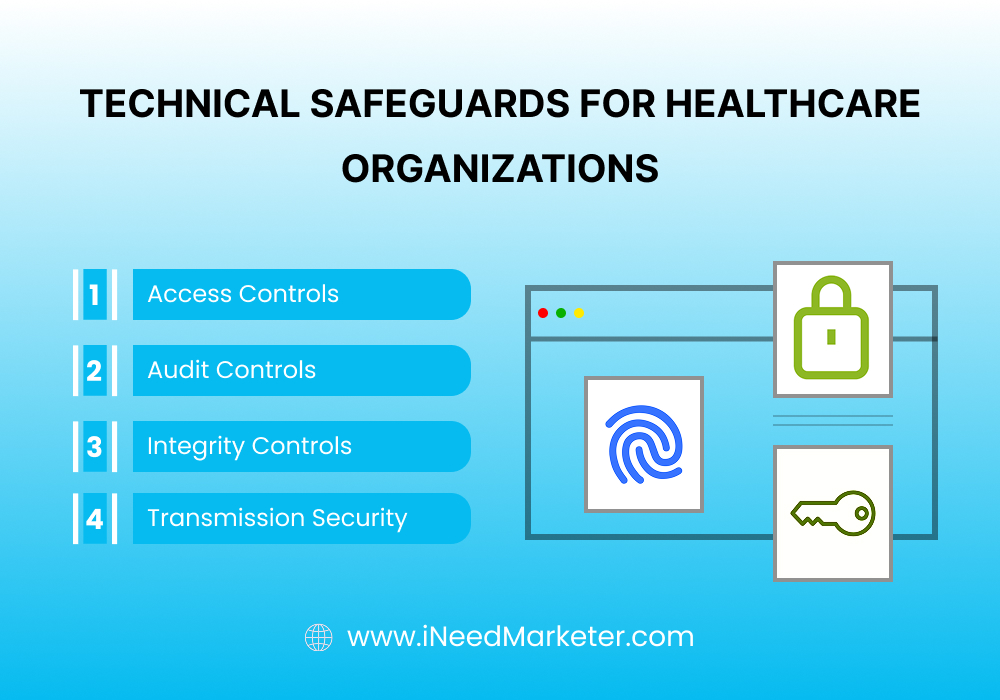
Technical safeguards are technology-based security measures that protect electronic protected health information (ePHI) and control access to it. Under HIPAA’s Security Rule, organizations must implement:
- Access Controls: Technology ensuring only authorized individuals can access ePHI, including user authentication, encryption, and audit controls.
- Audit Controls: Technology recording and examining access to ePHI, creating an audit trail documenting who accessed what information and when.
- Integrity Controls: Technology ensuring ePHI hasn’t been improperly modified or destroyed, maintaining data accuracy and completeness.
- Transmission Security: Technology protecting ePHI while it’s being transmitted over networks or the internet.
- These aren’t optional “nice-to-haves.” HIPAA mandates specific technical controls, and failure to implement them is one of the most commonly cited violation categories during OCR audits.
The HIPAA Security Rule requires healthcare organizations
Encryption: Your First Line of Defense
Encryption is perhaps the most important technical safeguard and the most frequently cited area of non-compliance. If data is encrypted, even if it’s stolen or accessed unauthorized, it’s essentially useless to an attacker.
Encryption at Rest (Data Stored)
Encryption at rest protects PHI stored on servers, databases, computers, external drives, mobile devices, and backup systems.
Requirements:
- Encrypt ALL ePHI stored on any system or device
- Use encryption algorithms of AES-256 or equivalent strength
- Manage encryption keys securely with restricted access
- Document what data is encrypted, how, and where keys are stored
Implementation Checklist:
Servers and Databases:
- Enable database-level encryption for all databases containing PHI
- Use Transparent Data Encryption (TDE) if the database platform supports it
- Encrypt entire server volumes with BitLocker (Windows), FileVault (Mac), or LUKS (Linux)
- Verify encryption is enabled before systems go into production
- Test encryption/decryption functionality quarterly
Laptops and Workstations:
- Enable full-disk encryption on all workstations and laptops
- Windows: BitLocker or third-party solutions like VeraCrypt
- Mac: FileVault 2
- Enforce policy requiring encryption on all employee-owned devices accessing PHI
- Verify encryption is enabled through mobile device management (MDM)
Mobile Devices:
- Require encryption on all smartphones and tablets accessing PHI
- iOS: Built-in encryption (always enabled for password-protected devices)
- Android: Require encryption through device policies
- Implement mobile device management (MDM), enforcing encryption
- Enable remote wipe capability for lost or stolen devices
- Require complex passwords and automatic screen locks
External Drives and USB Devices:
- Prohibit use of unencrypted USB drives or external drives
- If external storage is necessary, require encryption using BitLocker-to-Go or similar
- Maintain inventory of all external storage devices
- Securely destroy devices at end-of-life using certified data destruction
Backup Systems:
- Encrypt all backup media and systems
- This includes both on-site and off-site backups
- Test backup restoration regularly to ensure encrypted backups are recoverable
- Verify encryption is working on backup systems (common gap: backups created without encryption)
Cloud Storage:
- If using cloud providers (AWS, Azure, Google Cloud), enable encryption at rest
- Verify providers offer encryption at rest in their standard service
- Understand encryption key management—does provider manage keys or do you?
- Review encryption capabilities in Business Associate Agreements with cloud providers
- Document encryption implementation in your cloud infrastructure
Email Systems:
- Encrypt email messages containing PHI using S/MIME or TLS
- Implement email encryption policies automatically encrypting outbound PHI
- Secure email gateways can filter for PHI and automatically encrypt appropriate messages
Encryption in Transit (Data Moving)
Encryption in transit protects ePHI while it’s being transmitted over networks, the internet, or between systems.
Requirements:
- Encrypt all ePHI in transit using TLS 1.2 or higher
- Use HTTPS for all web-based access to systems containing PHI
- Use VPNs for remote access to systems containing PHI
- Encrypt data transfers between systems
- Avoid transmitting PHI over unencrypted channels
Implementation Checklist:
Network Communications:
- Deploy firewalls at network perimeter protecting systems containing PHI
- Use Virtual Private Networks (VPNs) for all remote access to PHI systems
- Require TLS 1.2 or higher for all encrypted communications
- Disable legacy protocols (SSL 3.0, TLS 1.0, TLS 1.1)
- Implement network segmentation isolating systems containing PHI
- Monitor network traffic for suspicious activity
Web Applications:
- Enable HTTPS on all web applications accessing PHI
- Use valid SSL/TLS certificates
- Test SSL/TLS configuration for weaknesses
- Implement HTTP Strict Transport Security (HSTS) forcing encrypted connections
- Keep web servers and applications updated with security patches
Email:
- Use TLS for email transmission
- Implement S/MIME encryption for sensitive messages
- Deploy secure email gateways filtering and encrypting PHI in email
- Avoid sending PHI through unencrypted email
- Train staff never to send PHI as email attachments without encryption
Remote Work:
- Require VPN for all remote access to systems containing PHI
- Use strong VPN encryption (AES-256)
- Implement multi-factor authentication for VPN access
- Disable direct access to PHI systems without VPN
- Monitor remote access logs for suspicious activity
Third-Party Integrations:
- If systems exchange PHI with third parties, use encrypted connections
- Verify all APIs use TLS encryption
- Implement certificate pinning to prevent man-in-the-middle attacks
- Test integrations periodically to verify encryption is functioning
Key Management:
- Store encryption keys separately from encrypted data
- Limit access to encryption keys to authorized personnel only
- Use hardware security modules (HSMs) to protect key material
- Rotate encryption keys periodically (at least annually)
- Document key management procedures, including backup and recovery
- If keys are lost or compromised, re-encrypt affected data with new keys
Testing and Verification:
- Conduct quarterly verification that encryption is functioning
- Use vulnerability scanners to identify weak encryption or missing encryption
- Perform penetration testing to verify encryption can’t be bypassed
- Document all encryption testing and results
- Maintain evidence of encryption implementation for audit purposes
Access Controls: Limiting PHI to Those Who Need It
Access controls ensure only authorized individuals can access ePHI, implementing the principle of “minimum necessary” access.
User Authentication and Identification
Requirements:
- Assign unique user IDs to every user (no shared accounts)
- Implement strong password requirements and policies
- Use multi-factor authentication for sensitive functions or remote access
- Enforce automatic logoffs after periods of inactivity
Implementation Checklist:
User IDs:
- Implement unique user IDs for all staff members and contractors
- Disable shared accounts—each person gets individual credentials
- Link user IDs to specific individuals for accountability
- Maintain a record of all user IDs and associated individuals
- Remove user IDs immediately when staff separate
Passwords:
- Enforce minimum 12-character passwords with complexity requirements
- Require mix of uppercase, lowercase, numbers, and special characters
- Implement periodic password changes (at least annually, more frequently for administrative accounts)
- Don’t allow reuse of recent passwords
- Implement account lockout after failed login attempts
- Never store passwords in plain text
- Implement single sign-on (SSO) to reduce password management burden
- Use password managers for staff to store complex passwords securely
Multi-Factor Authentication (MFA):
- Implement MFA for all administrative accounts
- Implement MFA for remote access to systems containing PHI
- Implement MFA for critical functions (user account creation, access removal, system configuration)
- Use authenticator apps or hardware tokens rather than SMS when possible
- Test MFA implementation to ensure it can’t be bypassed
- Document MFA requirements in security policies
Session Management:
- Implement automatic logoff after 15-30 minutes of inactivity
- Require re-authentication for sensitive functions even within active sessions
- Prevent concurrent logins from multiple locations (or require re-authentication)
- Clear session data after logout
- Log all login and logout activities
Role-Based Access Control (RBAC)
Requirements:
- Implement role-based access control, limiting users to the minimum necessary access
- Grant access based on job function, not individual need
- Document business justification for all access grants
- Review access at least quarterly
Implementation Checklist:
Define Roles:
- Create job roles defining typical access needed: Physician, Nurse, Billing, Administrative, IT, etc.
- Define exactly what systems each role accesses and what functions they can perform
- Document business justification for each role’s access
- Use principle of least privilege—grant minimum access necessary
- Separate incompatible roles (one person shouldn’t both write PHI and delete records)
Implementation:
- Configure systems to enforce role-based access
- Use directory services (Active Directory) to manage role assignment
- Automatically grant and revoke access based on role assignment
- Prevent manual overrides of role-based access
- Log all access control changes
Access Review Process:
- Establish quarterly or semi-annual access review process
- Managers review their staff’s access and verify it’s appropriate
- Document all access reviews with dates and approvers
- Remove unnecessary access immediately
- Especially scrutinize superuser and administrative access
- Flag and investigate unusual access patterns
Handling Role Changes:
- When employees change roles, immediately revoke old access
- Grant new access only after documented approval
- Don’t leave access from previous role—clean break
- Especially critical for staff leaving clinical roles
- Use termination checklist to ensure complete access removal
Separation of Duties:
- Prevent conflicts of interest through access controls
- One person shouldn’t control entire transaction (request, approve, implement)
- Billing staff shouldn’t have access to write clinical notes
- Administrative staff shouldn’t approve their own salary changes
- IT staff shouldn’t have clinical access and clinical staff shouldn’t have system administration access
Audit Controls and Access Logs
Requirements:
- Maintain comprehensive logs recording all access to ePHI
- Logs must show who accessed what information, when, and what action was taken
- Retain logs for at least 6 years
- Monitor logs regularly for unauthorized access or suspicious activity
Implementation Checklist:
Logging Requirements:
- Enable logging on all systems containing PHI
- Log all successful and failed login attempts with timestamp
- Log all access to PHI with timestamp, user ID, and data accessed
- Log all administrative actions (user account creation, access changes, configuration changes)
- Log all system events (errors, security exceptions)
- Ensure logs are detailed enough to reconstruct user activity
Log Storage and Protection:
- Store logs on centralized logging system (SIEM or log management tool)
- Protect logs from deletion or modification by unauthorized users
- Encrypt logs both at rest and in transit
- Maintain separate backup copies of logs
- Encrypt backup logs to prevent unauthorized access
- Ensure logs can’t be accessed by general system users
Log Retention:
- Retain logs for at least 6 years as required by HIPAA
- Document log retention policy and procedures
- Implement automatic log archival to long-term storage
- Securely destroy logs after retention period
- Document destruction activities
Log Review and Monitoring:
- Review access logs regularly looking for suspicious activity
- Implement automated alerting for:
- Bulk data exports (accessing many records at once)
- Off-hours access (access outside normal business hours)
- Failed login attempts (repeated failed attempts indicating attack)
- Administrative changes (access grants, user account creation)
- Access by terminated employees
- Investigate all alerts within 24 hours
- Document investigation results
- Implement Security Information and Event Management (SIEM) tools for advanced monitoring
- Use machine learning-based analytics to detect subtle suspicious patterns
User Access Review:
- Conduct monthly review of access logs for high-risk users
- Review all access by staff with administrative privileges
- Review all access by staff accessing sensitive data (psychiatric records, HIV status, substance abuse)
- Investigate any access that doesn’t have clear business justification
- Document findings and remediation
Integrity Controls: Preventing Unauthorized Modification
Integrity controls ensure ePHI hasn’t been altered, destroyed, or lost through accidental or intentional means.
Data Integrity Verification
Implementation Checklist:
Hash Verification:
- Use cryptographic hashing to verify data integrity
- Calculate hash values for sensitive data and store separately
- Periodically verify current hash matches original hash
- Any mismatch indicates data has been modified
Digital Signatures:
- Use digital signatures for critical documents or transactions
- Verify signatures to ensure authenticity and non-repudiation
- Implement signing procedures for clinical notes, orders, and authorizations
Error Correction and Detection:
- Implement error correction codes detecting bit-level corruption
- Use checksums for data transmission verification
- Implement validation rules preventing invalid data entry
Backup and Disaster Recovery
Implementation Checklist:
Backup Procedures:
- Implement regular, automated backups of all systems containing PHI
- Backup frequency: daily minimum, more frequently for critical systems
- Test backup restoration procedures monthly
- Verify backup data is encrypted
- Store backup copies off-site for disaster recovery
Redundancy:
- Implement redundant systems for critical functions
- Use RAID storage for local redundancy
- Implement database replication across geographically diverse locations
- Monitor redundant systems to ensure they’re functioning
Recovery Procedures:
- Document disaster recovery procedures specifying roles and responsibilities
- Establish recovery time objectives (RTOs) for critical systems (how fast systems must be recovered)
- Establish recovery point objectives (RPOs) for data loss tolerance
- Conduct quarterly disaster recovery drills testing actual recovery procedures
- Document results and update procedures based on learnings
Transmission Security: Protecting Data in Motion
Transmission security protects ePHI transmitted over networks, from local networks to the internet.
Network Security
Implementation Checklist:
Firewalls:
- Deploy firewalls at network perimeter
- Configure firewalls to block all unauthorized inbound traffic
- Create rules allowing only necessary services
- Disable unnecessary open ports and services
- Log firewall activity and review logs regularly
- Update firewall rules when systems or access patterns change
Network Segmentation:
- Isolate systems containing PHI on separate network segments
- Restrict traffic between network segments using firewalls
- Implement micro-segmentation restricting lateral movement
- Don’t allow direct access from public internet to PHI systems
- Use demilitarized zones (DMZs) for internet-facing systems
Intrusion Detection and Prevention:
- Deploy intrusion detection systems (IDS) monitoring network traffic
- Deploy intrusion prevention systems (IPS) blocking malicious traffic
- Monitor for attack signatures and anomalous traffic patterns
- Alert on potential intrusions and investigate promptly
- Update detection signatures regularly
Secure Remote Access:
- Implement VPNs for all remote access to systems containing PHI
- Require strong authentication (multi-factor authentication) for VPN access
- Use encryption standards of AES-256 or equivalent
- Limit VPN access to only necessary systems
- Implement network access control verifying devices are compliant before VPN access
- Monitor remote access logs for suspicious activity
Wireless Network Security:
- If wireless networks access PHI systems, implement strong security
- Use WPA2 or WPA3 encryption (not WEP)
- Implement strong authentication for wireless access
- Isolate wireless networks from wired networks containing PHI
- Use certificate-based authentication for staff wireless access
- Disable public guest networks from accessing PHI systems
- Monitor wireless traffic for unauthorized access
Secure Communications
Implementation Checklist:
Email Security:
- Implement email encryption for messages containing PHI
- Use TLS for all email transmission
- Implement secure email gateways filtering for PHI and encrypting appropriate messages
- Train staff never to send unencrypted PHI via email
- Implement email archiving for compliance and eDiscovery
- Encrypt archived email
Secure File Transfer:
- For transferring files with PHI between systems or organizations:
- Use SFTP (Secure File Transfer Protocol) instead of FTP
- Use HTTPS for web-based file transfers
- Use encrypted file transfer services
- Encrypt files before transfer
- Verify file integrity after transfer
Secure APIs and Web Services:
- Use TLS 1.2+ for all API communications
- Implement strong authentication for API access
- Use API keys or OAuth 2.0 for API authentication
- Encrypt sensitive data in API requests and responses
- Log all API access
- Implement rate limiting to prevent abuse
- Keep APIs updated with security patches
System Hardening: Reducing Attack Surface
System hardening reduces vulnerabilities that attackers can exploit.
Patch Management
Requirements:
- Keep all systems updated with security patches
- Establish process for timely application of critical patches
Implementation Checklist:
Patch Assessment:
- Subscribe to vendor security notifications
- Review patches as they’re released
- Assess criticality: is this a critical security patch?
- Determine if patch is applicable to your systems
- Plan deployment timeline (critical patches: within 30 days)
Testing:
- Test patches in non-production environment before deployment
- Verify patches don’t break existing functionality
- Document patch testing results
Deployment:
- Deploy patches on defined schedule (e.g., monthly patch Tuesday)
- Prioritize critical systems and patches
- Implement automatic patching where possible
- Document all patches deployed
- Verify patches were successfully applied
Verification:
- Verify all systems have current patches
- Use vulnerability scanners to confirm patches are applied
- Monitor vendor advisories for patches you might have missed
Vulnerability Scanning
Implementation Checklist:
Regular Scanning:
- Conduct vulnerability scans at least quarterly
- Scan all systems connected to networks containing PHI
- Use automated vulnerability scanning tools
- Scan for known vulnerabilities in applications and systems
- Review scan results and prioritize remediation
Penetration Testing:
- Conduct annual penetration testing
- Hire third-party firms to test security from attacker perspective
- Test ability to breach network perimeter
- Test ability to access PHI systems
- Document findings and remediate vulnerabilities identified
Configuration Review:
- Verify systems are configured securely (default passwords changed, unnecessary services disabled)
- Check for insecure settings and misconfigurations
- Compare configuration against security baseline
- Document and remediate any deviations
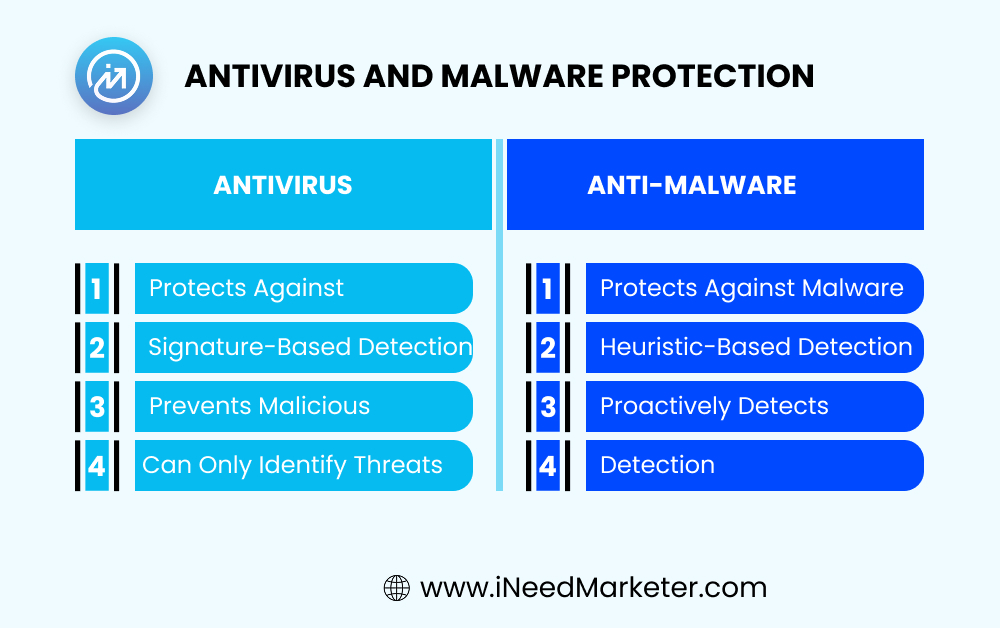
Antivirus and Malware Protection
Implementation Checklist:
Deployment:
- Install antivirus/anti-malware on all systems
- Ensure protection is installed on servers, workstations, and mobile devices
- Configure automatic updates of virus definitions
- Enable real-time scanning
Monitoring:
- Monitor for malware detections
- Quarantine or delete detected malware
- Investigate source of infections
- Consider user education if malware indicates security awareness gap
Device Management
Implementation Checklist:
Mobile Device Management (MDM):
- If staff use mobile devices (phones, tablets) for PHI access:
- Implement mobile device management (MDM) solution
- Enforce device policies: password requirements, encryption, automatic lock
- Enable remote wipe for lost or stolen devices
- Monitor device compliance with policies
- Prevent non-compliant devices from accessing PHI
Acceptable Use Policies:
- Create policy defining acceptable use of company devices
- Specify that devices accessing PHI must follow security requirements
- Prohibit use of personal devices unless they meet security requirements
- Implement Bring Your Own Device (BYOD) program with security requirements if applicable
- Require staff acknowledgment of policies
Incident Response and Detection
Technical safeguards should include capabilities to detect and respond to security incidents.
Security Monitoring
Implementation Checklist:
Security Information and Event Management (SIEM):
- Implement SIEM tool collecting logs from all systems
- Centralize log analysis and alerting
- Create correlation rules identifying attack patterns
- Set up automated alerts for suspicious activity
- Generate regular reports on security events
Alerting:
- Implement alerts for critical events: failed login attempts, access to sensitive records, administrative changes
- Configure alert severity levels
- Route alerts to appropriate response team
- Ensure alerts are monitored 24/7
Baseline Establishment:
- Establish baseline of normal system behavior
- Use machine learning to identify deviations from baseline
- Investigate anomalous behavior
Incident Response
Implementation Checklist:
Incident Response Plan:
- Document procedures for responding to security incidents
- Define roles and responsibilities
- Establish 24/7 incident response capability
- Create escalation procedures
- Define communication protocols
Breach Investigation:
- When potential breach is discovered, immediately investigate
- Determine what data was accessed
- Determine who was affected
- Assess whether breach notification is required
- Document all investigation activities
Implementing Technical Safeguards: A Roadmap
Successfully implementing technical safeguards requires planning and prioritization.
Phase 1 (Months 1-3): Assessment and Planning
- Conduct technical risk assessment identifying current gaps
- Document what systems contain PHI and what safeguards are needed
- Prioritize safeguards by risk and feasibility
- Develop implementation plan with timeline and budget
Phase 2 (Months 4-9): Quick Wins
- Implement encryption on high-priority systems
- Deploy access controls on critical applications
- Establish centralized logging
- Implement multi-factor authentication for administrative access
- Deploy firewalls if not already in place
Phase 3 (Months 10-18): Core Safeguards
- Implement comprehensive access controls
- Deploy intrusion detection systems
- Implement SIEM and advanced monitoring
- Establish incident response capabilities
- Complete patch management and vulnerability management processes
Phase 4 (Ongoing): Maintenance and Optimization
- Regular testing and verification of safeguards
- Continuous monitoring and alerting
- Regular security assessments
- Periodic penetration testing
- Update safeguards based on emerging threats
Conclusion: Technical Excellence Is Non-Negotiable
In 2025, technical safeguards aren’t an optional compliance exercise. They’re essential to protecting your patients’ data from increasingly sophisticated cyber threats.
Organizations that implement comprehensive technical safeguards—encryption, access controls, logging, monitoring, and incident response—can face OCR audits with confidence and protect patient data from real-world threats.
The cost of implementing technical safeguards is far less than the cost of a breach—in fines, notification costs, legal fees, and reputational damage. Modern healthcare organizations must implement modern security controls.
Related Resources:
- HIPAA Compliance Checklist: The Complete 2025 Guide – Full implementation roadmap covering all three types of safeguards
- HIPAA Violations and Penalties: What You Need to Know – Understand enforcement trends and costly mistakes